Website widget
Embed
Drop one script into your site, pick the entry workflow, and match the widget to your brand.
Shared inbox · Human takeover
Orqiva turns website and Telegram conversations into reliable answers with visual workflows, your own model key, and a human handoff when it matters. No cloud account. No lock-in.
Start in one command
npm install -g orqivaBundled FrankenPHP · SQLite by default · Node.js 22+
Works with Gemini, OpenAI, and OpenRouter.
7
Workflow nodes
3
AI providers
2
Live channels
1
Command to start
Channels
Start with the website widget. Add Telegram for mobile. Both land in the same inbox, with the same audit trail.
Embed
Drop one script into your site, pick the entry workflow, and match the widget to your brand.
Long polling
Paste a BotFather token. Orqiva polls for updates, so you never expose a public webhook.
Coming soon
A familiar channel for customers who live in WhatsApp. Planned for the same inbox and workflow engine.
Human takeover works the same on every channel.
Providers
Connect Gemini, OpenAI, or OpenRouter per user. Keys are encrypted at rest; choose the model inside each AI Agent node.
No provider markup. Usage is tracked per step so you can see where tokens go.
Fast multimodal models for chat, reasoning, and structured replies.
Reliable general-purpose models with broad tool and JSON support.
One key for a wide catalogue of hosted models and fallbacks.
Why Orqiva
The pieces you need to ship a real assistant — and the controls to keep it accountable.
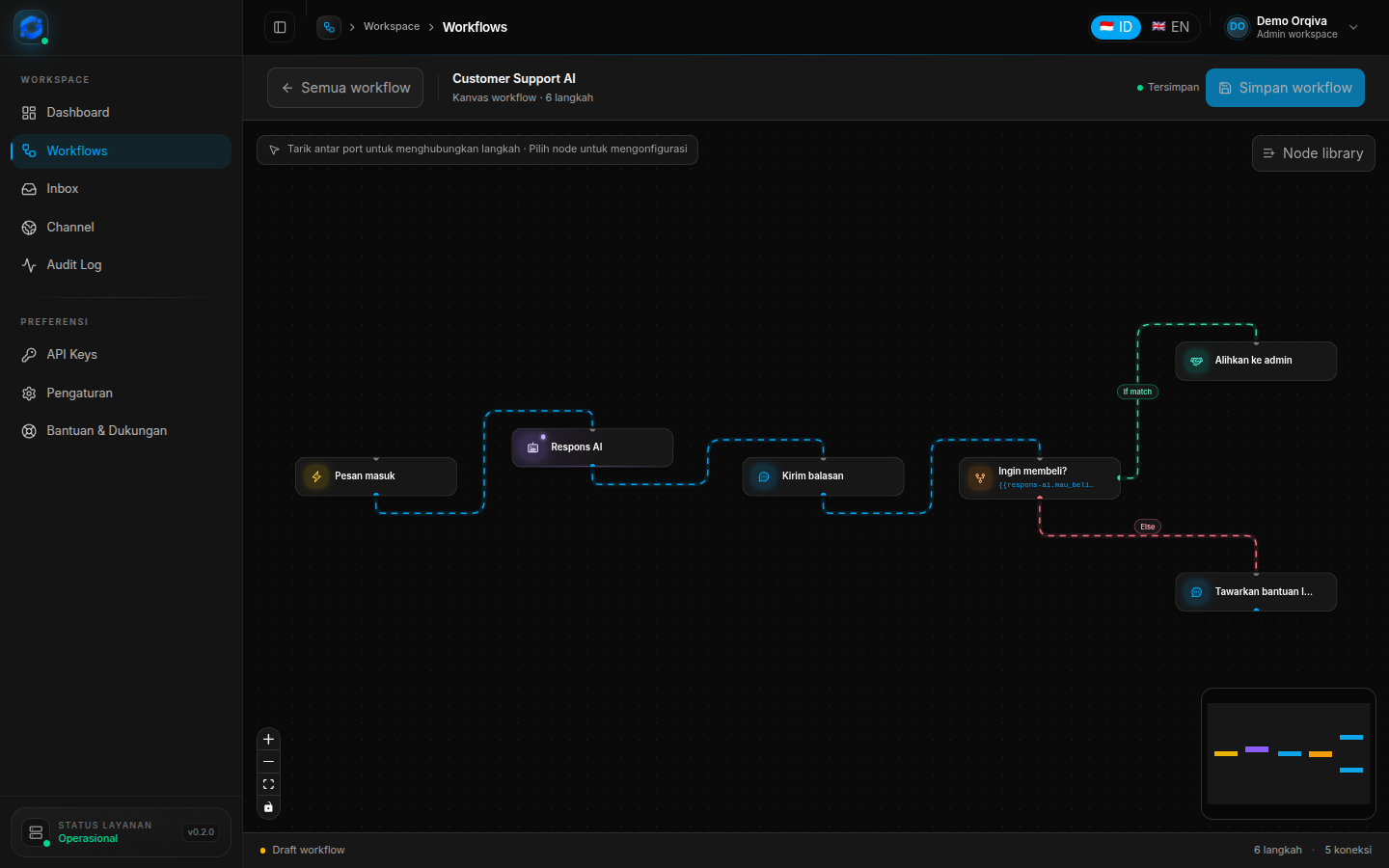
Compose triggers, AI agents, conditions, replies, jumps, and handoffs on a canvas. The server validates the graph before every run.
Use Gemini, OpenAI, or OpenRouter with keys encrypted per user. Pick the model per AI Agent node.
Take over a session, reply as a human, then hand it back. Full contact history stays in one place.
Every step records input, output, variables, tokens, duration, and errors. Failed runs resume from the last checkpoint.
Connect a bot and receive updates through long polling. No public URL, tunnel, or certificate.
The CLI ships FrankenPHP, migrations, a queue worker, and the Telegram poller. Install, run, open the browser.
Workflow editor
Nodes expose only the settings that matter. Variables flow forward automatically, and validation catches missing triggers, unreachable nodes, and invalid branches before a customer ever sees them.
How it works
Useful on a laptop before it becomes a production deployment.
Install the CLI, start the local service, and create your admin account in the browser. SQLite and the runtime are prepared for you.
npm install -g orqivaAdd a Trigger, an AI Agent, and a Send Message. Branch with a Condition when needed. Validate on save.
Embed the website widget or connect a Telegram bot. Conversations land in the same inbox, with the same audit trail.
Get started
The CLI is the fastest path. Use the source setup when you want to develop or deploy the Laravel API and React app yourself.
Requirements for source: PHP 8.3+, Composer, Node.js 22+, and npm.
Read the setup guideInstall Orqiva, connect a model key, and publish your first workflow today. The data never leaves your machine.
MIT licensed · No account required